🎰 Built for Slot Games

Ship Stunning VFX
Without Writing Code

The professional browser-based particle editor for Cocos Creator & PixiJS. Design, animate, and export production-ready visual effects — all from your browser.
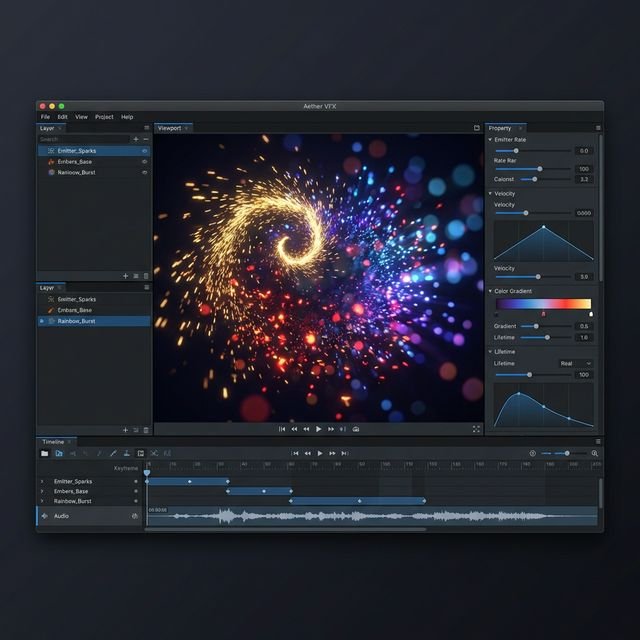

SlotVFX Editor Interface — Browser-based WebGL particle editor with timeline, inspector, force fields, and live preview for Cocos Creator 2D slot games
100+
Ready-Made Presets
15
FX Shader Types
60fps
Real-Time WebGL Preview
1-Click
Cocos Creator Export
✨ Dissolve
🌊 Ripple
⚡ Glitch
💎 Bloom
🔮 Chromatic Aberration
🌀 Noise Warp
🎯 Zoom Blur
🎨 LUT Grading
💫 Vignette
🔥 Pixelate
🌈 Directional Blur
🎬 Film Grain
⚔️ Sharpen
💡 Lighten/Darken
✨ Dissolve
🌊 Ripple
⚡ Glitch
💎 Bloom
🔮 Chromatic Aberration
🌀 Noise Warp
🎯 Zoom Blur
🎨 LUT Grading
💫 Vignette
🔥 Pixelate
🌈 Directional Blur
🎬 Film Grain
⚔️ Sharpen
💡 Lighten/Darken

Everything You Need to Ship
World-Class VFX

A complete VFX authoring suite — from particle physics to screen transitions — all in your browser, all export-safe.

🎨

WebGL Particle Engine

GPU-accelerated particle rendering with real-time physics, gravity, turbulence, color ramps, blend modes, and animated textures — all at 60fps.

⏱️

Timeline & Keyframe Editor

Professional keyframe timeline with multi-track animation, curve editing, auto-record mode, and frame-precise control over every property.

🧲

Force Fields & Physics

Interactive attractors, repellers, vortex fields, magnetic dipoles, orbit automation — all with falloff curves and kill radii.

15 Screen & Area FX

Dissolve, ripple, glitch, bloom, chromatic aberration, LUT grading, zoom blur, noise warp, vignette, pixelate, and more — with 100+ presets.

🦴

Spine Character Support

Import Spine skeletons directly, position and animate them alongside particles, and apply image FX stacks for unified visual composition.

🎥

Recording Pipeline

Export spritesheets (PNG), WebM videos, or ZIP bundles with one click. Includes mobile/mid/high presets and memory estimation.

🛤️

Paths & Motion

Create bezier paths for particles or force fields. 12+ path presets (spiral, figure-8, zigzag) with progress curves and jitter.

📦

Asset Library

Centralized shared asset library for textures, LUTs, noise maps, and masks with admin tools, tagging, search, and one-click binding.

🎰

State Machine

Visual state machine for triggering VFX based on game events — idle, win, bonus, transition — with configurable transitions and conditions.

SlotVFX Preset Gallery — 100+ ready-made VFX particle presets for slot games including fire, explosions, magic, confetti, and screen transitions
100+ Presets

Start Fast.
Customize Everything.

Production-ready presets for every slot game scenario — combat hits, magic spells, UI feedback, environment ambience, and cinematic transitions. Every preset is fully editable and Cocos-export-safe.

💥 Hit Sparks 🔥 Fire Loop 💜 Arcane Ring 🎊 Confetti ⚡ Lightning 💨 Smoke 🌟 Level Up 🌀 Portal 💎 Glitch Hit 🌊 Shockwave ❄️ Snow Fall 🎴 Card Reveal

From Concept to Game
In Four Steps

SlotVFX is designed for speed. Artists create effects visually — developers get export-ready JSON and spritesheets with zero manual work.

Design

Choose a preset or start from scratch. Tweak particles, forces, paths, and FX in the live WebGL viewport.

Animate

Use the timeline to keyframe any property. Auto-record mode captures changes as you scrub — no manual key placement.

Preview

A/B compare with snapshots, ghost overlays, and the performance HUD. Fine-tune until it's pixel-perfect.

Export

One-click export to Cocos Creator — generates JSON data, spritesheets, Spine assets, and runtime scripts.

Built for Production

Every effect you build is export-safe. Spritesheets, JSON data, and Cocos Creator runtime scripts — ready to ship.

🎮

Cocos Creator 3.8

Native integration with AdvancedParticleSystem runtime. Force fields, FX stacks, paths, and state machines all export seamlessly.

🖼️

Spritesheets (PNG)

Export frame sequences as optimized spritesheets with configurable resolution, frame count, and atlas packing — mobile, mid, or high.

📹

Video (WebM)

Record effects as WebM videos for marketing, documentation, or quick sharing with stakeholders — no external tools needed.

Runtime API

Full Control in
Your Game Code

Both Cocos and PixiJS runtimes give you a clean scripting API for dynamic control — timeline scrubbing, FX layer manipulation, state machines, force fields, and more.

🧲 Force Field API 💥 Burst Control ⏯️ Pause / Resume / Seek ⏱️ Timeline Control ✨ FX Layer Control 🎰 State Machine
View Full API Reference →
  BlackHoleController.ts
// Move force field to follow a game object
update(dt: number) {
  const pos = this.targetNode.worldPosition;
  const local = uiTrans.convertToNodeSpaceAR(pos);

  this.vfx.updateForceField('Black Hole', {
    x: local.x,
    y: local.y,
    strength: 500 + Math.sin(Date.now() / 1000) * 200
  });
}

// One-liner controls
this.vfx.emitBurst(50);
this.vfx.setTimeScale(0.5);  // slow-mo
this.vfx.setActivePath('Spiral Out');

Ready to Build
Incredible VFX?

Open the editor in your browser and start creating production-ready visual effects in minutes — no install, no setup.

Launch SlotVFX Editor →

Frequently Asked Questions

Everything you need to know about SlotVFX

SlotVFX is a professional browser-based VFX particle editor built specifically for 2D slot game development. It features 100+ ready-made presets, real-time WebGL preview, timeline keyframe animation, force fields, screen & area FX shaders, Spine support, and one-click export to Cocos Creator and PixiJS.

SlotVFX supports Cocos Creator 3.8+ with native TypeScript components and PixiJS v7/v8 with a self-contained JavaScript runtime. Effects can be exported for either engine with a single click.

No. SlotVFX runs entirely in your browser — no installation, no plugins, no downloads. Just open the editor at app.slotvfx.com and start creating effects.

SlotVFX offers a free tier with core features. Premium features including unlimited exports, advanced FX shaders, and team collaboration are available with a subscription.

Yes. SlotVFX includes a real-time WebGL preview in the editor, plus a Quick Test feature that opens a live PixiJS preview directly in your browser without needing to export.